Four modules
carry the whole thing.
Sales wins the work, Work delivers it, Money gets you paid, Marketing brings them back. Growth breaks when those four drift apart — so they run on one data model. A deal, its invoice, its project, and the campaign that started it are the same record, not four copies in four tools.
Every conversation,
on the deal it belongs to.
Calls, texts, emails, and voicemails land on the contact automatically. Pick up a deal you haven't touched in three weeks and read the whole history in one scroll — no hunting through inboxes and phone logs to reconstruct what was said.
Run your whole business from your pocket.
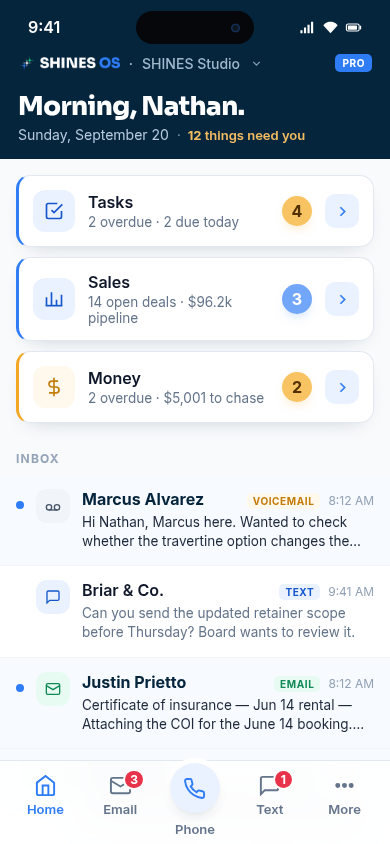
Founder-led businesses do not stop when you leave your desk. See what needs you, call and text customers, move deals, chase invoices, and keep the work moving from one place.
The same customers, conversations, work, and money - with you in the field.
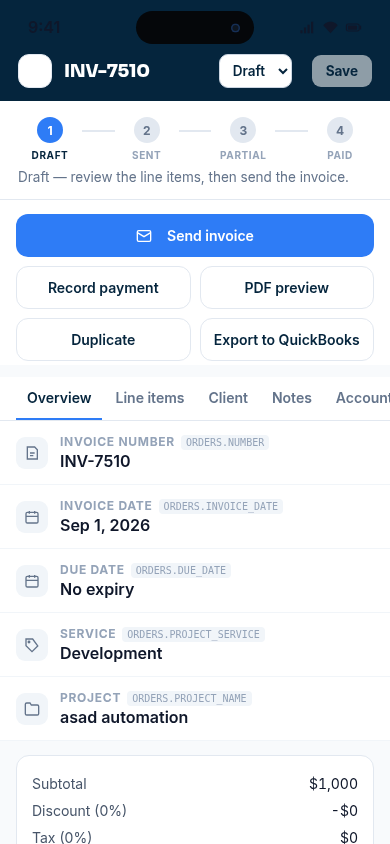
Send the invoice - create it, review it, send it, record payment, or push it to QuickBooks without waiting to get back to your desk.
Add the contact while it is fresh - capture the company, person, source, email, and phone before the lead disappears into your notes.
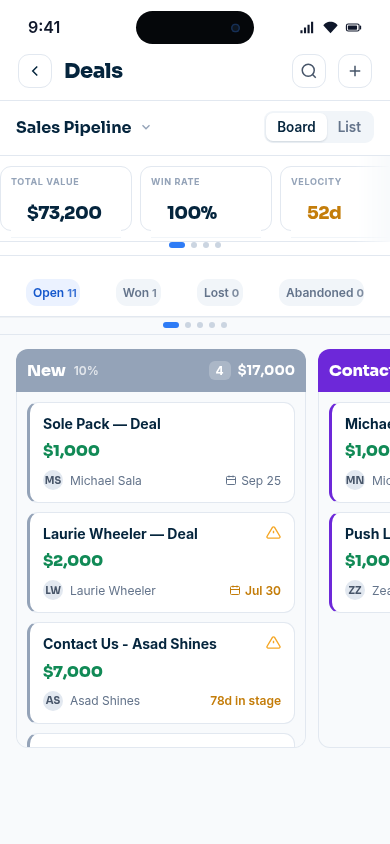
Move the deal - see the pipeline value, open deals, stage, win rate, and what has sat too long, then act on it.
Call, text, and email from the record - every conversation stays attached to the customer instead of living on your phone.
Turn follow-up into work - create tasks from calls and keep the work moving from the field.
Chase the money - see what is unpaid, send the next invoice, and follow the payment through.
Field Companion is in active beta for iOS and Android.
AI that does the work, not another chatbot.
Bolt watches the moments where revenue usually stalls, then runs the next step inside SHINES OS. It can respond, create the record, route the follow-up, and keep the pipeline moving while you stay on the work.
Not a chatbot - a campaign that does work for you.
You set the campaign. Bolt carries out the actions.

Lead to cash
Qualify the inbound lead instantly from the submitted details.
Email the lead from Ace with your booking link.
Text the follow-up from the business line when the lead consented.
Create the contact and deal in the Sales Pipeline at New.
Alert you with the lead details and a direct link to the deal.
Book the call and keep the next action moving.
Move the deal and flag deals that stall.
Send the invoice and chase late payments.
Follow up until the deal is closed.
The live lead-capture campaign is running now. The later lead-to-cash actions are the product direction, not claims that every step is automated today
No tab to watch. No prompt to type. One campaign turns a new inquiry into a live deal with the next conversation already moving.
Everything else, when you're ready.
Start with the CRM. Add modules the month you need them and turn them off the month you don't — your invoice follows automatically.